Portfolio and enterprise
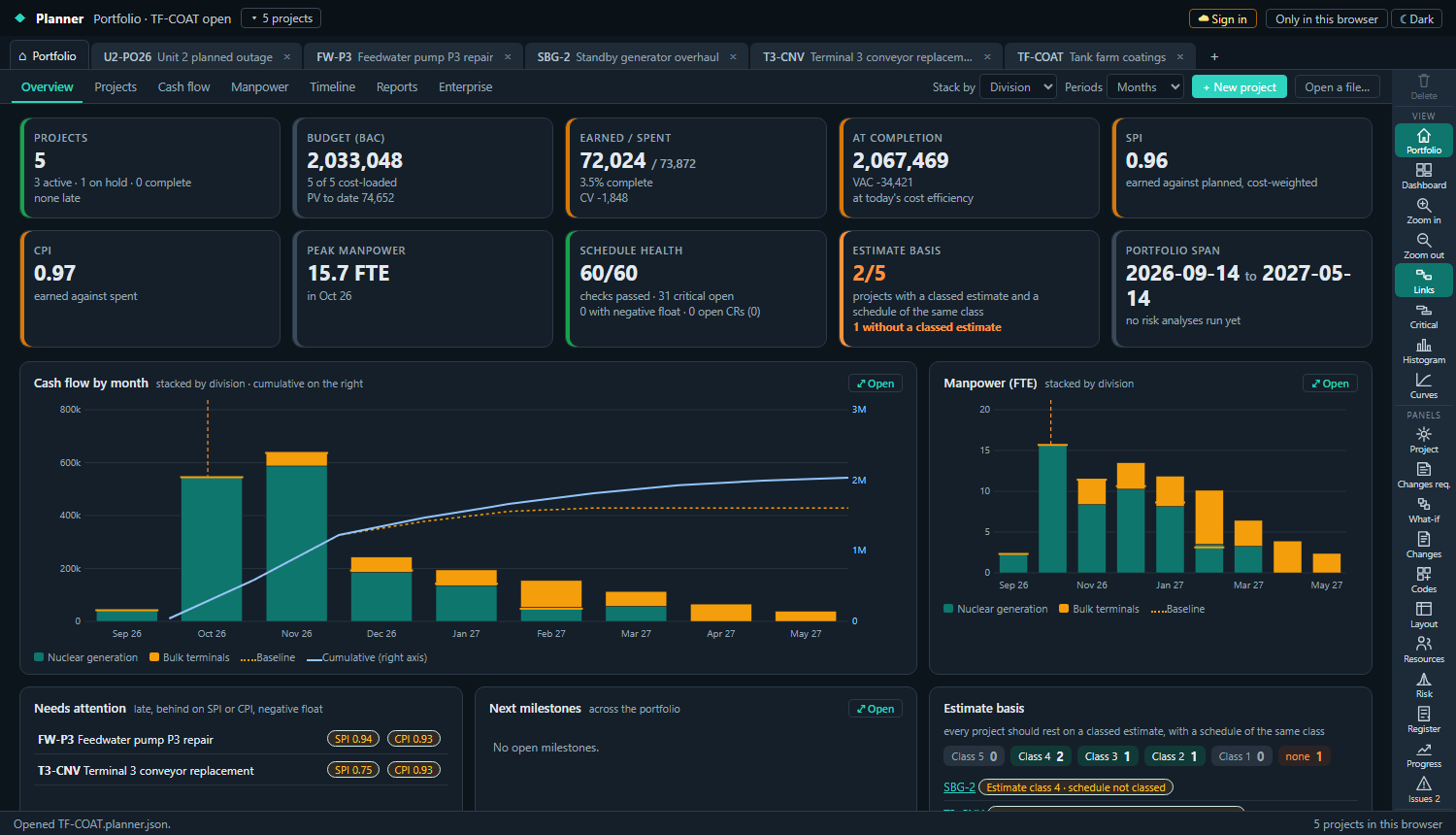
The Portfolio window is what opens when no project is open: every project in the workspace, rolled up for the executive review, and the enterprise setup the projects are placed in.
The views
- Overview: projects, budget, earned and spent, at completion, SPI and CPI, peak manpower, schedule health, estimate basis and the portfolio span; cash flow and manpower by month stacked by division, OBS, portfolio, client or status; the projects that need attention; the next milestones.
- Projects: every project in a table grouped on two levels, with the organization columns or the performance columns (BAC, PV, EV, AC, EAC, VAC, SPI, CPI). Click a field to set it; the pick lists offer the enterprise lists.
- Cash flow and Manpower: the stacked charts in full with the table by period, against the baselines, to CSV.
- Timeline: every project as a bar against its baseline, grouped, with the data date and the late days. Click a project to open it.
- Reports: the portfolio report pack with the sections you pick, printable to PDF, and the projects table to CSV.
- Enterprise: the lists below.
Placing a project in the company
Each project carries a division, an OBS node (the responsible manager), a portfolio, a client, a project manager and a status (planning, active, on hold, complete, cancelled). Set them in the Project panel or the Projects view. XER imports bring their OBS and project codes; the Estimator brings the estimate's class.
Estimate class and schedule class
Every project should rest on a classed estimate, with a schedule of the same class. The project records the estimate class and reference (number, revision, date) and the schedule class. The overview counts the projects that are aligned and flags the ones without a classed estimate or with a schedule finer or coarser than the estimate it rests on.
Enterprise setup
The Enterprise view holds the lists that every project picks from, kept in the workspace:
- Divisions, portfolios, clients: plain lists; a portfolio has a description.
- OBS: the organizational breakdown as a tree, each node with a responsible manager.
- Resource list: the enterprise resources by code, with kind, limit and rate; a project's Resources panel adds from this list, and a project's resources can be imported into it.
- WBS templates: standard breakdowns (planned outage, capital project, online maintenance) applied to a new project, or captured from an existing one.
The executive review
A typical month: the planners record their progress updates; the overview shows the portfolio at the new data dates; the projects that are late, behind on SPI or CPI or carrying negative float rise to the top; the report pack goes to the review with the cash flow, the manpower, the timeline and the project table. Open any project from the review to see the detail behind a figure.
Ask the assistant
With the portfolio open, the assistant answers across every project: which need attention and why, a summary for the review, where the cash flow peaks. See The assistant.